AI Video Editor: Transform Your Workflow in 2026
Other
You've probably got more usable video than you can publish.
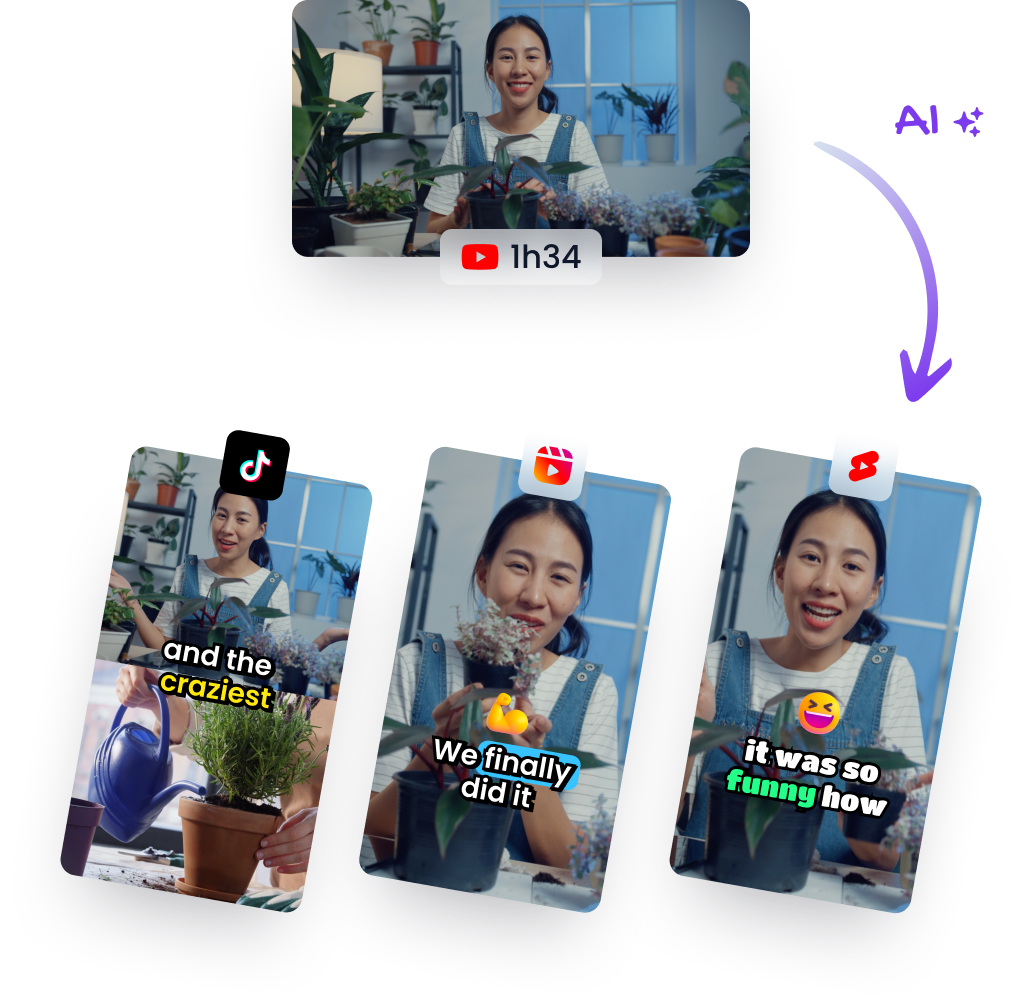
A podcast episode, a webinar recording, a customer interview, a sales demo, a founder update. The hard part isn't making the long-form piece anymore. The hard part is turning that one asset into clips that fit TikTok, Reels, Shorts, LinkedIn, and whatever else your team posts to every week.
That's where the old workflow breaks. Manual editing turns content repurposing into a backlog. You know there are good moments buried in the footage, but finding them, cutting them cleanly, reframing them for vertical, adding captions, and exporting multiple versions eats the time you were supposed to spend on scripting, publishing, and distribution.
The End of the Manual Editing Bottleneck
Most creators hit the same wall. They don't run out of ideas. They run out of editing hours.
A single long-form video can contain a week or a month of short-form content. But if every clip requires manual scrubbing, hand-set cuts, custom crops, subtitle cleanup, and separate exports, you stop thinking like a publisher and start thinking like a person stuck in post-production. That's a strategic problem, not just a software problem.
The category has moved well beyond experimentation. The AI video editing market is projected to grow from about US$0.9 billion in 2023 to US$4.4 billion by 2033, with a 17.2% compound annual growth rate from 2024 to 2033, according to ElectroIQ's cited market research on video editing statistics . That matters because it signals something practical. Automated clipping, reframing, and captioning are now part of a real production stack, not a novelty.
For busy teams, the shift is simple. Instead of asking, “Do we have time to edit this into shorts?” the question becomes, “Which moments are worth publishing?” That's a very different job.
Practical rule: If your team records long-form content regularly, editing is no longer the place to spend most of your human attention. Review and selection are.
A key advantage of an AI video editor isn't that it makes every clip perfect on the first pass. It's that it removes the dead time between recording and publishing. It gets you to draft clips faster, which means you can spend more of your effort on hooks, pacing, captions, brand voice, and distribution decisions.
If you want a concrete look at how teams use AI for this exact repurposing problem, this breakdown of AI for cutting videos is a useful starting point.
What Is an AI Video Editor Really
An AI video editor is easiest to understand if you stop thinking of it as a smarter timeline and start thinking of it as an assistant editor.
Traditional editing software waits for instructions. You tell it where to cut, what to crop, where to place subtitles, how to resize the frame, and which portion of the transcript matters. An AI video editor tries to do the first pass of that labor for you. It watches, transcribes, segments, suggests, and reformats. Then you review.
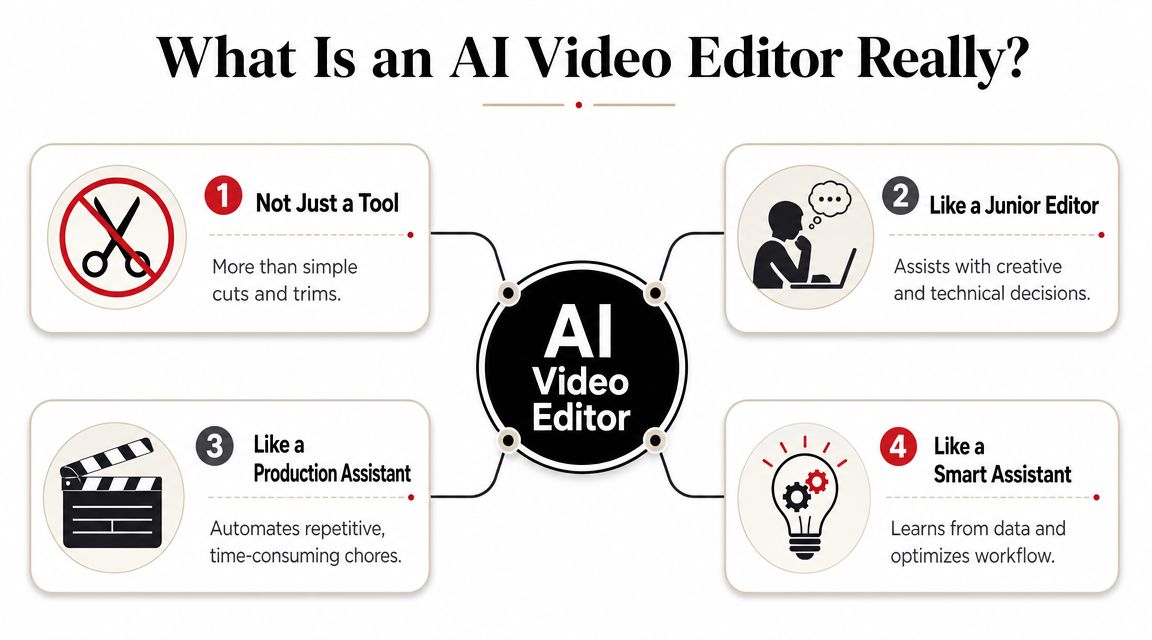
It behaves more like a junior editor
The useful mental model isn't “magic button.” It's “junior team member who's fast, tireless, and sometimes wrong.”
That junior editor can usually handle tasks like:
- Sorting raw footage: separating sections, identifying scene changes, and recognizing when a speaker starts or stops
- Building a rough cut: assembling likely clip candidates from a longer recording
- Turning speech into editable text: giving you transcript-based access to the content instead of forcing timeline scrubbing
- Preparing social formats: generating vertical, square, or widescreen variants from one source file
This is why the user's role changes. You're no longer spending most of your time assembling. You're directing, correcting, and approving.
A close parallel exists in language work. The difference between automated output and polished output is similar to the gap discussed in machine vs human translation . Machines can do a lot of the throughput work, but nuance, intent, and final quality still benefit from human judgment. Video editing is heading in the same direction.
What the software is actually “understanding”
Under the hood, these tools aren't just applying filters. They're using combinations of computer vision, speech-to-text, and pattern recognition to identify shots, speakers, focal points, and transcript segments. In practice, that means the system can often tell where one topic ends, where emphasis spikes, when a face should stay centered, and where captions should be placed.
That's the conceptual leap. The software isn't only executing commands. It's making a first-pass interpretation of the footage.
The AI handles the repetitive interpretation work. The creator keeps the final say on meaning, taste, and message.
If you're comparing products, it helps to look at examples of tools built around this assistant-style workflow rather than old-school timeline editing with AI features bolted on. This roundup of the best AI video editing software is useful because it frames the category by job-to-be-done, not just feature lists.
Core AI Capabilities That Save You Hours
AI video editors save the most time in the middle of the job. Not in the flashy final polish, but in the repetitive work that slows down every repurposing pipeline.
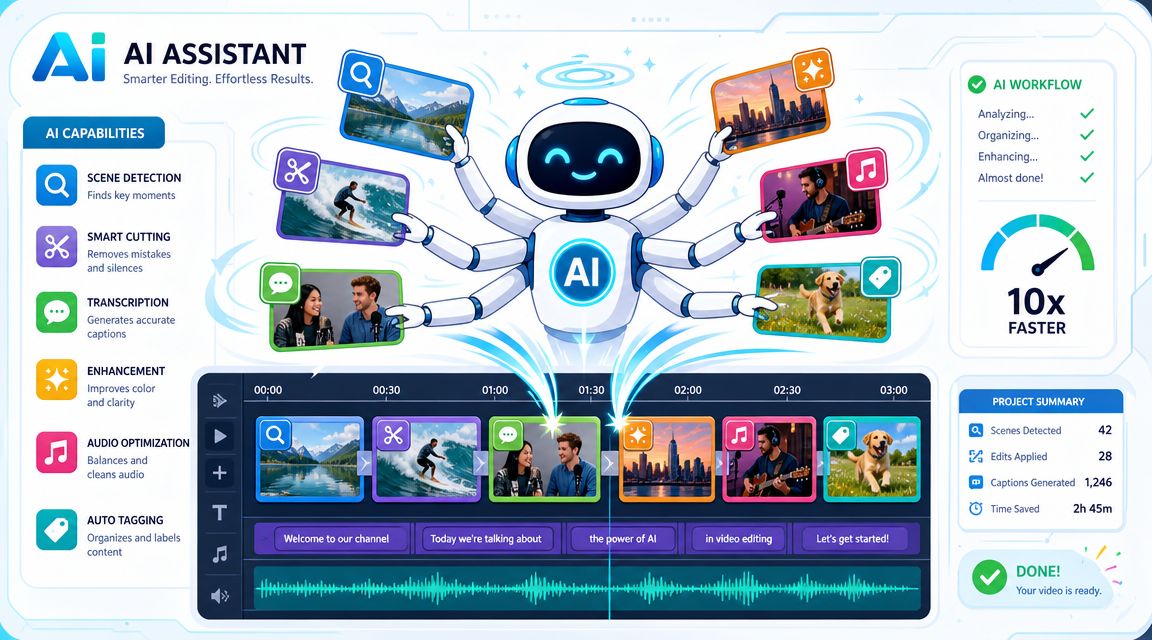
For creators, that shift changes the role. Less time goes to scrubbing timelines, marking cuts, and resizing exports by hand. More time goes to choosing the angle, tightening the message, and deciding which version fits YouTube, LinkedIn, or Shorts.
Scene detection and rough cuts
The first useful capability is footage segmentation. The software detects scene changes, speaker shifts, pauses, and topic breaks, then builds a draft structure you can react to.
That matters because raw footage is rarely organized for publishing. A webinar starts late. A podcast meanders before it gets sharp. An interview includes repeated answers, mic checks, and side conversations that no viewer needs. In a manual workflow, an editor spends a large chunk of time finding the actual starting point.
A good AI rough cut does not replace editorial judgment. It gives you a workable first pass. That is a big difference if you produce content weekly and need three short clips, one clean long-form edit, and platform-specific versions from the same source file.
Auto-reframing and transcript-based editing
The workflow change becomes obvious at this point.
For repurposing, the strongest combination is auto-reframing, transcript editing, and highlight discovery. Finepoint's analysis of AI in video production explains why these features matter in practice. They reduce the amount of timeline hunting and manual resizing that used to make short-form repackaging a separate project.
In day-to-day use, each feature solves a different bottleneck:
- Auto-reframing keeps the speaker, product, or action centered when you turn a horizontal recording into vertical or square formats.
- Transcript editing lets you cut by deleting text, which is often faster than dragging through a long waveform to find the same sentence.
- Highlight detection gives you candidate moments to review, which is far better than starting with a blank timeline.
The trade-off is accuracy. Auto-reframing can lose context if two people are talking or if the important visual is not a face. Transcript editing can miss nuance if the transcription is messy. Highlight suggestions still need a human pass, especially if your style depends on timing, sarcasm, or a slow build.
Used well, though, these features turn one recorded asset into a batch of publishable outputs. That is the core value. The creator stops acting like a machine operator and starts acting like a creative director for distribution.
For marketers who want a broader view of how this fits into campaign production, Cometly's guide to AI video is a useful companion.
Automatic captions and cleanup
Captions are one of the clearest examples of AI removing low-value manual work.
Automatic captioning makes subtitles fast enough to include by default, which matters for social clips, interviews, explainers, and any talking-head content where viewers often watch on mute first. Many tools also handle filler-word removal, silence trimming, background noise reduction, and basic audio leveling in the same pass.
That does not mean the output is ready to publish untouched.
Names, product terms, technical jargon, and overlapping speech still break caption accuracy. Noise cleanup can also sound too aggressive if the tool smooths the voice into something flat or unnatural. I treat these features as draft generators, not final polish.
If a tool saves twenty minutes on subtitles but introduces brand-damaging caption errors, the work is not finished. It just moved to review.
If clip selection is the bottleneck in your process, this guide on how to find highlights in video with AI gets specific about the part that usually consumes the most time.
A Typical AI Video Editing Workflow
A common creator workflow now looks like this. Record one solid long-form piece, hand the first pass to AI, then spend your time choosing what deserves to be published.
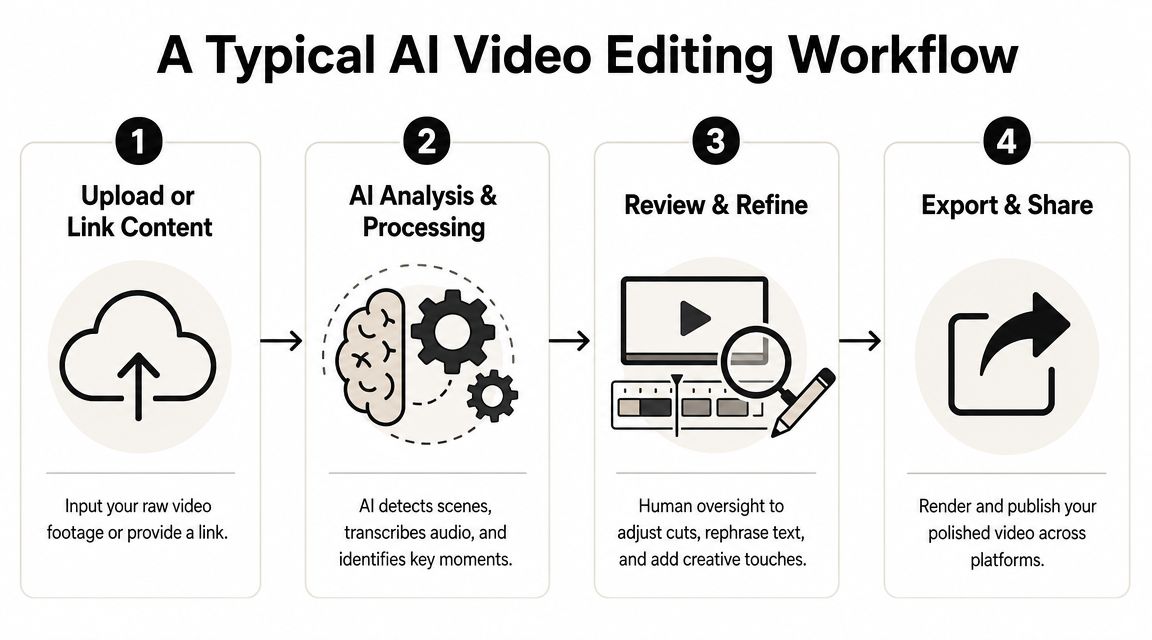
Step one starts with existing content
The process usually begins with footage you already have. A podcast episode, webinar replay, customer interview, sales demo, training session, or YouTube upload.
That matters because the job is no longer “edit this video from scratch.” The job is “turn one asset into several publishable versions.” For busy creators, that is the shift that changes the workflow. The raw material already exists. The question is how fast you can turn it into clips for TikTok, Shorts, Reels, LinkedIn, or email campaigns without rebuilding everything by hand.
The AI handles the rough assembly
Once you upload the file or paste a video link, the tool starts doing the work an editor used to do manually in sequence. It generates a transcript, spots pauses, identifies speaker changes, suggests highlights, reframes for vertical formats, and applies captions.
That first pass is where the time savings show up. Instead of scrubbing through an hour-long recording to find three usable moments, you start from a shortlist. Instead of making separate crops for each platform, you review what the software already prepared. Some tools also group clips by theme or pull quote, which is useful when the goal is not one finished video but a week or two of repurposed content.
A short demo helps make that feel concrete:
Review is still the part that decides quality
AI speeds up selection. It does not understand your audience, your brand risk, or the difference between a good sentence and a strong opening hook.
My review pass usually focuses on four things:
- Hook strength: cut the slow setup and start where the value begins.
- Accuracy: fix names, product terms, numbers, and any caption errors.
- Framing: check whether auto-crops still hold up during movement, screen shares, or two-person conversations.
- Context: make sure the short clip still means what the speaker intended in the full version.
This is the practical trade-off. The tool saves time on mechanics, but it can still choose a clip that is technically clean and strategically weak. A sentence that reads well in a transcript may fall flat on camera. A highlight that performs on Shorts may feel off-brand on LinkedIn. That is why creators using AI well start acting more like distribution editors and creative directors than timeline operators.
For teams planning where each finished asset should go next, these smart creator content strategies help connect editing decisions to distribution.
Export becomes the easy part
By the time you reach export, the expensive work is already done. You are approving versions, not assembling every deliverable from zero.
That is the fundamental workflow change. AI video editing shifts the bottleneck from manual production to editorial judgment. For creators publishing across multiple channels, that is a much better place to spend time.
How to Choose the Right AI Video Editor
Choosing the right AI video editor starts with a blunt question. What job are you hiring it to do?
Some tools are built for end-to-end editing. Some are stronger at generated video. Others are best used as repurposing machines for long-form content. If you skip that distinction, you'll end up comparing products that solve different problems.
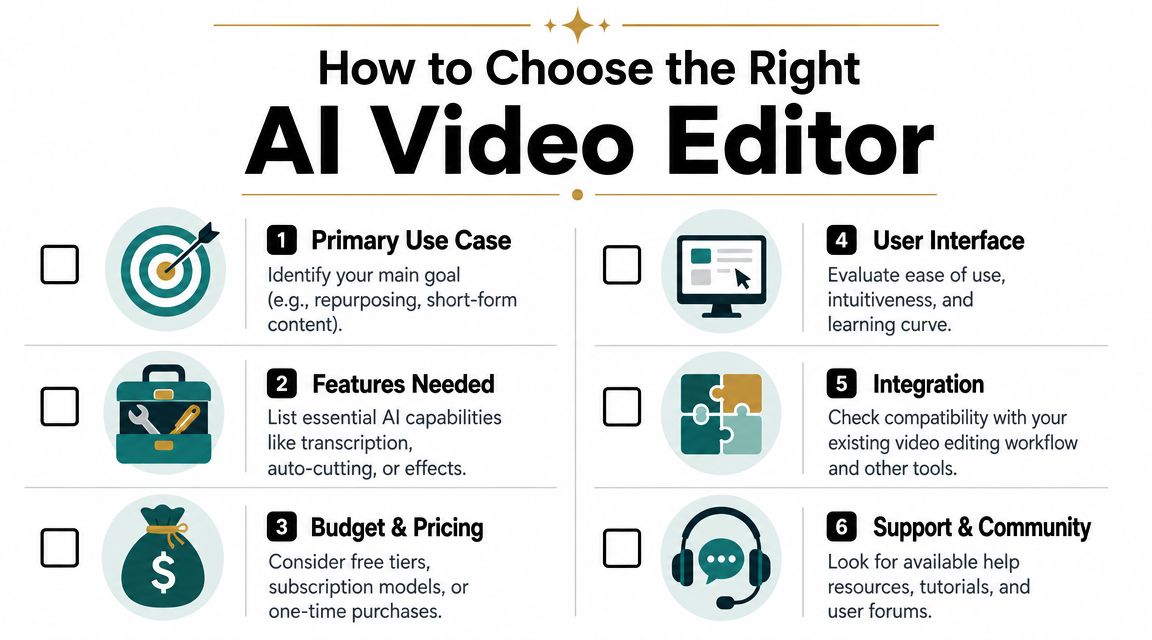
Start with the content you already make
A podcaster, a webinar marketer, and a gaming creator all need different things.
If your source material is mostly talking-head content, interviews, presentations, or podcasts, prioritize tools that are good at transcript parsing, speaker framing, captioning, and finding clean pull quotes. If your footage is highly visual, fast-cut, or B-roll-heavy, then motion handling and shot-level understanding matter more.
A simple decision filter helps:
Use caseWhat to prioritize
Podcast and interview repurposing
Transcript editing, auto-reframing, speaker tracking, captions
Webinar and education clips
Clear subtitle controls, highlight extraction, pacing cleanup
Social-first talking-head videos
Hook selection, mobile framing, branded caption styles
General editing support
Rough cuts, cleanup tools, export flexibility
Judge the tool by what still needs fixing
The easiest way to test an AI video editor is to ask not “What can it generate?” but “What errors will my team still need to clean up every time?”
The biggest productivity gains from generative AI often go to less-experienced workers or repetitive tasks, which means the smart use case is to let AI handle repeatable editing labor while keeping human oversight for quality control and nuanced creative judgment, as discussed in this video on where generative AI actually helps most .
That fits real editing work. AI is strong at repetitive structure. It's less reliable at subtle intent.
Here's what to stress-test during a trial:
- Caption accuracy: Does it handle your names, terminology, and speaking style well enough that editing captions feels light, not endless?
- Clip judgment: Are the suggested highlights interesting, or are they merely sentence fragments with no payoff?
- Reframing quality: Does the subject stay centered in vertical without awkward crops?
- Review speed: Can a human approve or fix clips quickly, or does the AI output create almost as much cleanup as manual editing?
Editorial test: Run one of your messier real videos through the tool, not your cleanest sample. That's where weaknesses show up.
Match the tool to a narrow job
General-purpose products can be useful, but specialist tools often win when the workflow is repetitive and valuable.
For example, Klap is built around one specific job: turning long-form videos into social-ready short clips with AI-generated selections, captions, reframing, and vertical formatting for platforms like TikTok, Instagram Reels, and YouTube Shorts. That's a different buying decision from choosing a broad editing suite for documentary work or heavy manual post-production.
The best choice depends on your bottleneck:
- If publishing volume is your problem, choose a repurposing-focused tool.
- If creative control on complex edits is your problem, choose software that gives deeper manual control with selective AI assistance.
- If your team is junior, favor simpler workflows with strong first-pass automation.
- If brand risk is high, prioritize review controls over speed claims.
Don't ignore workflow fit
A tool can look impressive in a demo and still fail inside your actual process.
Pay attention to boring but consequential details:
- Input flexibility: file upload, link import, and support for the platforms where your source content already lives
- Editing handoff: whether someone can quickly tweak a clip without learning a complex interface
- Output needs: aspect ratios, subtitle styles, and export settings your team uses every week
- Team reality: whether the person reviewing clips is an editor, a marketer, or a founder doing this between meetings
The right AI video editor doesn't replace your taste. It protects your time so your taste can be used where it matters.
The Future of Video Content Is AI-Assisted
The biggest change AI video editors bring isn't just faster editing. It's a reassignment of creative labor.
Creators used to spend a huge share of their energy on mechanical post-production work. Cutting pauses. Resizing frames. Building captions. Repeating exports. AI shifts that effort toward selection, direction, and story judgment. That's why the tools are useful even when they're imperfect. They move humans upstream.
This also changes who can compete. Smaller teams can now treat one long-form recording as a content library instead of a single upload. Agencies can review more options before delivery. Solo creators can publish more consistently without living inside a timeline all week.
The broader market direction reinforces that this isn't a temporary software fad. The global AI video market is projected to grow from US$4.55 billion in 2025 to US$42.29 billion by 2033, according to Grand View Research's AI video market report . That's a projection, but it points to the same practical conclusion many creators already feel in their workflow. Machine-assisted video production is becoming standard.
The useful mindset is simple. Don't ask whether AI will replace editors. Ask which editing tasks no longer deserve full manual effort.
If you already have long-form videos sitting on YouTube, in your webinar archive, or on your hard drive, the fastest way to understand this shift is to test it on real content. Try Klap with one existing video and see how quickly it can turn that source material into short, reviewable clips for your social workflow.